Keeping Your Steering Wheel Controls
How Axxess ASWC-1 and PAC interfaces work, when your head unit's own SWC input is enough, and the programming step people skip.
We earn a commission if you buy through links on this page. How this site makes money.
The short answer
Steering wheel controls stop working the moment you unplug a factory radio, because almost no aftermarket head unit can read a vehicle’s factory steering wheel wiring on its own. Getting them back working means one of two things: wiring the factory harness into your head unit’s own built-in learning input, if it has one and your car’s system is simple enough, or adding a dedicated interface module like the Axxess ASWC-1 or a PAC unit that translates the signal for you. Either way, there’s a programming step at the end that a lot of first-time installers skip, and skipping it is the most common reason the buttons stay dead even after the wiring is done correctly.
Why the buttons go dead in the first place
Factory steering wheel audio buttons work one of two fundamentally different ways. Resistive (analog) systems wire each button to a different resistor, so pressing a button produces a distinct voltage on one or two wires that a receiver can read and match to a function. Digital systems — CAN-bus, GMLAN/Class II on GM vehicles, or LIN on some other brands — send data messages over the vehicle’s shared communication network instead of a simple analog voltage.
An aftermarket head unit’s wired-remote input, where it exists, is built to read a resistive voltage signature. It has no way to parse a CAN-bus data message on its own. That’s the whole reason this is a separate problem from the rest of the install: you can wire in power, ground, and speakers with a standard harness adapter, and the steering wheel buttons will still do nothing until they’re specifically addressed.
When the head unit’s own input is enough
Some head units include a built-in self-learning steering wheel control input, capable of learning a vehicle’s resistive voltage signatures directly through a simple wiring patch — no separate translator box involved. Pioneer’s NEX receivers are one documented example: the feature exists, but it’s commonly disabled by default and has to be manually switched from “Off” to “With Adapter” (or the appropriate mode) in the settings menu before it does anything.
This path works only when two things are both true: your vehicle’s steering wheel system is genuinely resistive, not digital, and your specific head unit has that self-learning input built in. If either isn’t true, you need a separate interface module instead.
When you need a separate interface module
A true CAN-bus, GMLAN, or LIN factory system can’t be read by a simple resistive learning input at all — it needs a purpose-built module that decodes that vehicle’s specific digital protocol and hands the head unit a signal it understands. This is the job of interfaces like the Axxess ASWC-1 and PAC’s SWI-RC-1 and SWI-CP2.
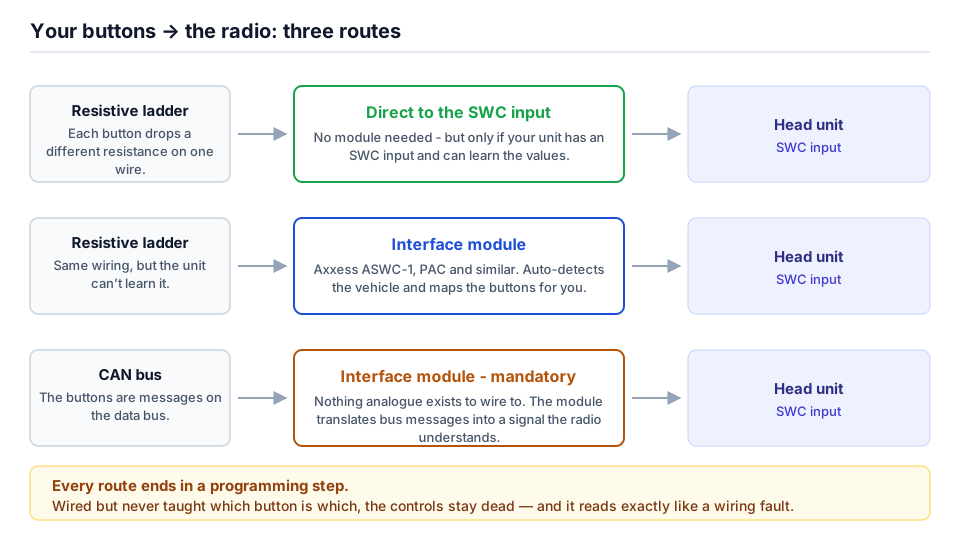
The Axxess ASWC-1 connects to the factory SWC wiring — typically +12V, ground, and one or more signal wires. Axxess’s own material and third-party installer training describe it as auto-programming itself on first power-up by learning the vehicle’s button voltage signatures; we have not been able to confirm that behaviour against a primary manufacturer document, so treat the manual programming procedure as the fallback you may still need, It then outputs a signal to the head unit’s wired-remote input. One cited technical distinction from competing modules: the ASWC-1 can accept multiple separate factory SWC wires on their own individual inputs, where some older PAC-style modules require combining multiple wires onto a single input using external resistors — worth knowing if your vehicle’s harness has more than the usual number of SWC signal wires.
PAC’s SWI-CP2 explicitly advertises compatibility with CAN-bus, GMLAN, and Class II systems in addition to resistive ones, and supports three ways to configure it: DIP switches referencing a vehicle-specific lookup in PAC’s ControlPRO software, direct USB firmware flashing from a PC, or manual button-learning mode. It also includes a 2A/12V accessory output used in some data-bus applications. Which configuration method you need depends on your specific vehicle, and PAC’s own lookup tools are the source to check rather than guessing.
Some vehicles use manufacturer-specific interfaces built for that platform rather than a universal module. GM trucks of the Silverado/Sierra generation, for example, are generally handled through a GM-specific data interface in the Axxess/Metra GMOS family rather than the ASWC-1, because that era of GM truck runs SWC over a Class II/serial data bus. Toyota vehicles including the Tacoma commonly use a Toyota-specific interface like the Metra/Axxess AX-TOY28SWC rather than a universal box, for the same reason — the vehicle-specific module is built and tested against that exact protocol. Jeep Wrangler JK and JL installers frequently recommend a PAC RP4-CH11 or an iDatalink Maestro module instead of a universal interface, and JL-specific radios like Alpine’s X409-WRA-JL bundle SWC retention into their vehicle-specific harness. Check what your specific vehicle actually uses before buying — a universal module sold for a resistive system will not work on a vehicle that communicates digitally, no matter how correctly it’s wired.
Resistive vs. CAN-bus, at a glance
| Resistive/analog | CAN-bus / GMLAN / LIN | |
|---|---|---|
| How it signals | Distinct voltage per button on one or two wires | Digital data messages on a shared vehicle network |
| Head unit’s own learning input | Can often read it directly, if the feature exists and is enabled | Cannot read it at all |
| What’s needed | Wiring only, or a simple universal interface (ASWC-1, SWI-RC-1) | A protocol-specific module (SWI-CP2, GMOS-series, Maestro) or vehicle-specific radio |
| Programming | Learning mode on the head unit or module | Vehicle-specific lookup, DIP switches, or firmware flash |
The programming step people skip
Wiring the interface in correctly is necessary but not sufficient. Two things still have to happen after the harness is connected: the head unit’s steering wheel control setting has to actually be turned on — not left at its factory-default “Off” — and the learning process has to run so the radio associates each incoming signal with the right function (volume up, track skip, voice command, and so on).
This is the step people skip because the buttons “should just work” once the wiring is right, and on some head units the harness connection alone genuinely isn’t enough. If your buttons are silent after a correctly wired install, check the head unit’s settings menu for a steering wheel control option before you assume the interface module or the wiring is at fault.
What to check before you buy
Confirm whether your specific vehicle uses a resistive or digital SWC system, and whether your chosen head unit has a working self-learning input for it — the head unit’s own manual, or the vehicle-specific fitment notes for your car, are the places to check rather than guessing from the wiring color code alone. If a vehicle-specific interface exists for your exact make, model and generation, it’s generally the safer bet over a universal module, since it’s built and tested against that platform’s exact protocol. For the rest of the harness — power, ground, speakers, illumination — see Wiring Harness Basics, and for where this step fits into the full install order, see How to Install a Double DIN Head Unit.
Frequently asked questions
Will my steering wheel controls just work after I install a new head unit?
No, not without extra wiring or a module. Nearly all major-brand aftermarket head units can't read a vehicle's factory steering wheel control wiring directly, so the buttons go dead the moment you unplug the factory radio unless something translates that signal for the new unit.
Do I need a separate interface box like the ASWC-1?
It depends on your vehicle and your head unit. If your car uses a simple resistive system and your head unit has a built-in self-learning SWC input, wiring the factory harness straight into that input can be enough. If your car uses a digital CAN-bus or GMLAN system, or your head unit lacks that learning input, you need a dedicated interface module.
What's the difference between resistive and CAN-bus steering wheel controls?
Resistive systems send a distinct voltage down one or two wires for each button, which a receiver reads and matches to a value. CAN-bus (or GMLAN, or LIN) systems send digital data messages over the vehicle's shared communication network instead, and a simple voltage-reading input can't decode that at all — it needs a module built for that specific bus protocol.
What's the programming step people skip?
Enabling the steering wheel control setting in the head unit's own menu, and then actually running the learning process so the radio associates each button with the right function. Wiring the harness in correctly is necessary but not sufficient — several head units ship with this function switched off by default.
Check what fits your car
Every unit above still has to physically fit your dash. These pages list what actually bolts into these vehicles, plus the dash kit, harness and adapters each swap needs: