Wired vs Wireless Apple CarPlay
How wireless CarPlay actually connects, what it costs your phone's battery, and why a cable still wins on a long commute.
We earn a commission if you buy through links on this page. How this site makes money.
The short answer
Wired and wireless CarPlay show you the same interface once you’re connected — same apps, same layout, same Siri. The difference is entirely in how you get there and what it costs along the way. Wireless drops the cable but adds a real battery drain, a longer wait to connect, and an occasional dropout a cable can’t have. For a short commute, that trade is usually worth it. For a long commute where you need CarPlay live and stable the whole way, a cable is still the more reliable choice.
How wireless CarPlay actually connects
Wireless CarPlay is not one continuous wireless link — it’s a handoff between two different radios. The first time you connect, your iPhone and the head unit pair over Bluetooth, exchanging the network credentials each side needs to find the other again. That’s a one-time setup step, similar to pairing any Bluetooth headset.
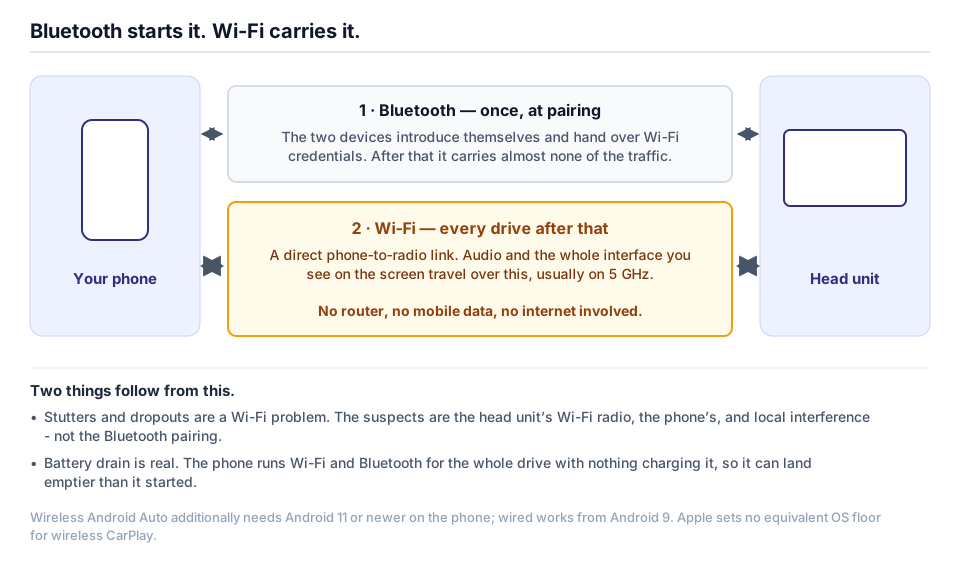
Every session after that runs over Wi-Fi, not Bluetooth. Once the phone and head unit recognize each other, they open a direct two-way Wi-Fi connection, and that link carries the actual CarPlay data — audio, the touchscreen interface, everything you interact with. Bluetooth’s only job going forward is the initial handshake that tells the two devices to open that Wi-Fi link; it isn’t doing any of the heavy lifting once you’re driving.
This matters for troubleshooting, because it means a wireless CarPlay problem can live in either radio. A head unit with weak Wi-Fi hardware, a phone with a flaky Bluetooth stack, or interference in the crowded 2.4 GHz or 5 GHz bands can each break the connection at a different stage, which is part of why “just re-pair it” doesn’t always fix a wireless dropout. For a deeper look at the specific fixes, see Fixing Wireless CarPlay Dropouts.
The battery-drain trade-off
Wireless CarPlay keeps your phone’s Wi-Fi and Bluetooth radios, and its screen, active for the entire drive, with nothing charging it in return. A wired connection does the identical job — same audio, same UI — while also feeding the phone power through the USB cable the whole time. On a 20-minute errand run, that difference is nothing you’ll notice. On a 90-minute commute, it’s a phone that lands at your destination meaningfully lower on battery than it started, especially if you’re also running turn-by-turn navigation, which keeps the screen and GPS radio working hard regardless of which connection method you use.
Some drivers solve this by plugging in anyway even on a wireless-capable head unit, purely for the charge — which is worth sitting with for a second, because it quietly undercuts the whole appeal of going wireless in the first place. If you’re going to have a cable running to the phone regardless, wired CarPlay was already the simpler option.
Connection time
A wired connection is close to instant: plug in, and CarPlay is usually up within a few seconds. Wireless takes longer, because the phone and head unit have to complete the Bluetooth handshake and then negotiate the Wi-Fi link before anything appears on screen — often ten to thirty seconds from a cold start, longer if either device is slow to wake its radios. Some units also need one initial wired connection before wireless will work at all, a quirk worth checking on a specific model before you assume it’s plug-free from day one.
| Wired CarPlay | Wireless CarPlay | |
|---|---|---|
| Connection time | Seconds | Roughly 10-30 seconds, sometimes longer on a cold start |
| Phone battery | Charges while in use | Drains with no offsetting charge |
| Reliability on a long drive | Consistent — a physical connection doesn’t drop to RF interference | Can stutter or drop from Wi-Fi congestion, phone OS interruptions, or a hot cabin |
| Convenience | Requires plugging in every trip | No cable to manage, once paired |
| Cost | Included on any CarPlay unit | Requires a wireless-capable head unit, or a wired unit plus a dongle |
Why wired still wins for a long commute
Owner reports and manufacturer support content converge on the same list of things that interrupt wireless CarPlay: RF congestion in busy areas, the phone’s operating system or a background app getting in the way, Wi-Fi hotspot confusion, a hot cabin throttling the phone’s wireless radio, or interference from a dashcam, OBD dongle, or tablet sharing the same spectrum. One head-unit manufacturer’s own support content is candid about this, describing an occasional stutter or an isolated drop in one specific spot as “radio reality, not a defective unit” — and drawing the line at a genuine defect only when drops happen every few minutes, everywhere, even after troubleshooting.
None of that is a knock on wireless CarPlay as a feature. It works well for most people, most of the time. But “most of the time” is exactly the phrase that should give you pause on a long commute, where you actually need CarPlay live for the entire drive rather than reconnecting itself somewhere on the highway. A physical cable removes that entire category of failure. It can still have a bad connector or a broken wire, but it cannot lose a Wi-Fi signal to a crowded parking garage or a hot dashboard, because there’s no wireless signal involved in the first place.
The wired-unit-plus-dongle option, honestly
If your head unit only has wired CarPlay, a separate wireless CarPlay adapter dongle can add wireless without replacing the unit. It plugs into the USB port and presents itself to the head unit as a normal wired CarPlay device, while separately holding its own wireless link to your phone — a workaround, not a firmware upgrade. Two things about this are worth being straight about. First, it only works on a head unit that already supports wired CarPlay; it cannot add CarPlay to a unit that has no CarPlay support at all. Second, it’s a second piece of hardware with its own firmware, its own Wi-Fi radio, and its own way to fail — you’re not eliminating the reliability question wireless raises, you’re adding a device on top of it. For some buyers that’s still the right call, especially if replacing a working head unit outright isn’t worth the cost. Just don’t assume it makes wireless categorically more reliable than a native wireless unit; if anything, it’s one more link in the chain.
What to actually do
If most of your driving is short trips around town, wireless CarPlay’s convenience is a real upgrade and the occasional reconnect is a minor cost. If your daily drive is a long highway commute where you need CarPlay live the whole time, buy a unit with wired CarPlay and treat wireless as a bonus, not something you’re relying on. Several of the units on our wireless CarPlay picks support both — wireless for convenience, a cable in hand for the day it actually matters. For the Android side of this trade-off, see Wired vs Wireless Android Auto, and for what the rest of a Chinese Android head unit’s spec sheet means, Android Head Unit Specs, Decoded is next.
Frequently asked questions
Does wireless CarPlay use Bluetooth or Wi-Fi?
Both, in two separate stages. Bluetooth handles the one-time pairing handshake; every actual CarPlay session after that runs over a direct Wi-Fi link between your phone and the head unit.
Will wireless CarPlay drain my phone's battery faster than plugging in?
Yes. Wireless keeps your phone's Wi-Fi and Bluetooth radios and screen active for the whole drive with no compensating charge, while a wired connection does the same job and tops up the battery through the USB cable at the same time.
Can I add wireless CarPlay to a unit that only has wired CarPlay?
Only with a separate dongle, and only if the head unit already supports wired CarPlay. The dongle plugs into the USB port and pretends to be a normal wired CarPlay device while it holds its own wireless link to your phone; it can't add CarPlay to a unit with no CarPlay support at all.
Is wireless CarPlay actually less reliable than wired?
Structurally, yes — a cable can't lose a radio signal to interference, and Wi-Fi can. In practice most owners describe it as reliable enough for daily driving, with the occasional stutter or drop rather than a broken feature.
Check what fits your car
Every unit above still has to physically fit your dash. These pages list what actually bolts into these vehicles, plus the dash kit, harness and adapters each swap needs: